Data rooms control access. Spaces controls the file, even after it leaves.
Persistent, encrypted collaboration rooms in your own cloud. Every file is encrypted to a named identity. Download it, forward it, sync it: without the right identity, it's ciphertext. Revoke access at any time.
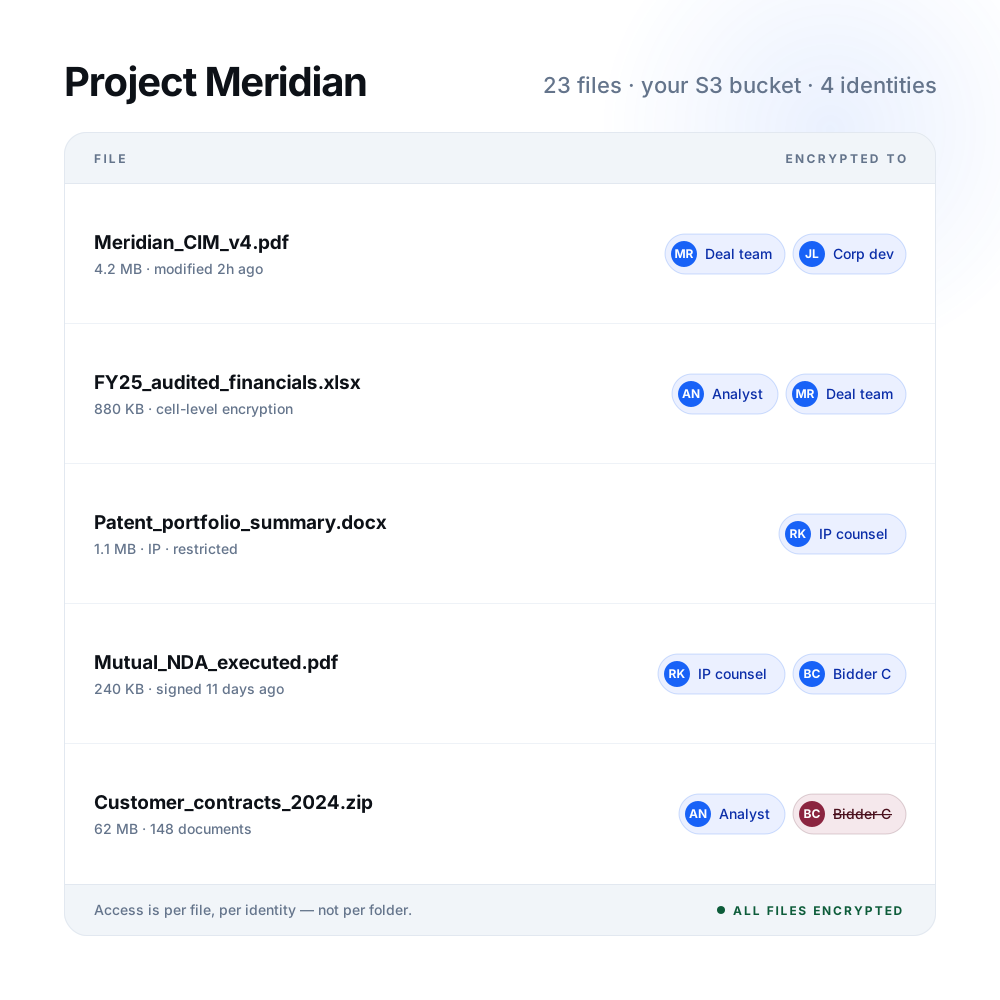
Step inside a live Space
Create a room, invite collaborators, upload files, and watch encryption happen per user, per folder, with a full audit trail throughout.
A shared folder is not a controlled workspace.
SharePoint, Google Drive, and Box give everyone in the project access to everything in the folder. One permission slip and the whole deal is visible. No per-user encryption, no identity-bound audit trail, and no way to revoke a file once it has synced to a device.
What happens today
Files live in a vendor's infrastructure, behind folder-level access. Everyone on the project can see everything in the folder, and once a file syncs, it's gone from your control.
What Spaces changes
The room runs in your own cloud, every file is encrypted to named identities, and access is cryptographic, so revoking actually revokes, on every device.
From cloud storage to an encrypted workspace
Spaces deploys into your existing infrastructure. A zero-trust collaboration layer on top of what you already own.
Create
Point Spaces at an S3 bucket or Azure container. The room exists in your infrastructure, and Confidencial adds the encryption and access layer on top.
Govern
Define permission groups and assign folder-level access before anyone is invited. Pull groups from your IdP or create them in the room. Each folder gets its own access policy.
Invite
Keys provision per identity based on the groups you defined. The analyst sees the financials folder, counsel sees agreements. Same room, different views, without re-uploading anything.
Collaborate
Folder hierarchy, version history, user permissions, check-in and check-out. It's familiar, like a shared drive. The encryption is underneath.
Most data rooms stop at the door. Protection should travel with the file.
Six capabilities that no shared drive or standard data room can match.
Protection wherever it goes
A bidder downloads your CIM and forwards it to a competitor. In a standard deal room, that file is gone. In Spaces, the encryption follows it. Every copy, every device. Revoke the identity, and they hit ciphertext, wherever they are.
Hosted by you
Data stays encrypted in your cloud, under your keys and policies. Confidencial never sees your content. Not on upload, not in transit, not at rest.
Zero-trust by default
Per-user encryption, no broad folder access. Every identity is explicitly authorized at the file level. A breach of one account doesn't compromise the room.
AI-safe insight
Search, summarize, and analyze across room contents without exposing sensitive fields to the model. Scoped AI sees what you authorize, ciphertext everywhere else.
Shared-drive feel
No portals, no new workflows, no friction. Folder hierarchy, version history, check-in and check-out, exactly how your team already works, with encryption underneath.
Persistent access
The room stays open for the life of the engagement. When the deal closes or the project ends, archive it. Access logs preserved, files encrypted, room sealed.
The moments where a shared drive has a price
Four situations where broad folder access, vendor-held data, or no lifecycle control leave you exposed.
A CIM goes to six potential buyers. One bid collapses. The files don’t come back.
Financials and IP move to multiple parties over weeks of diligence - each with different access, none with protection after download
Each buyer gets a scoped room and a complete audit trail. When a bid collapses, one action revokes every file across every device for that party, wherever the file went.
Ethical walls are location-based. Legal work is not.
iManage and NetDocs enforce policy inside the DMS. The moment a document leaves via email, Teams, or an AI workflow, governance ends. Privileged content from one matter can surface in another.
Each matter gets its own room with identity-bound encryption. No cross-matter visibility, even when collaborators overlap. Protection follows the file, not the platform.
The drafts carry the real IP risk. Not the finals.
Draft clinical protocols shared with CROs weeks before filing are where the IP walks. DLP stops accidents, not intentional sharing. Their security posture becomes your risk.
The CRO gets a room scoped to their engagement, expiring at study close. If they're compromised, what they hold is ciphertext. Revoke the engagement and the room goes dark.
A three-month implementation becomes a permanent shared drive no one ever closes.
The project ends. The shared folder doesn't. Former employees of the partner still have access. No one knows what was accessed after handoff.
A workspace that lives for the engagement and closes when it does. Access sealed, logs preserved, no orphaned permissions.
Three options. One that protects the file after it leaves.
Shared drives give broad access in a vendor’s cloud. Virtual data rooms lock you into a portal you don’t own. Spaces is a persistent encrypted workspace in your own infrastructure.
What security teams ask us first
How is Spaces different from a SharePoint site or a Box folder?
SharePoint and Box store your files and apply access controls at the folder level — but the data itself isn’t encrypted per user. Anyone with folder access sees everything in it, and files that sync to a device stay there even after permissions are removed. Spaces encrypts every file to named identities, runs in your own cloud storage, and makes revocation cryptographic — so removing access actually removes access, including on already-synced devices.
Where does the data actually live?
In your cloud environment. Spaces deploys into your existing AWS S3, Azure Blob, or GCP infrastructure — it doesn’t move your data into a Confidencial-managed environment. Confidencial provides the encryption and access layer. The files themselves never touch our servers in plaintext, and we have no ability to read your content.
Can different collaborators in the same room see different things?
Yes. Per-user encryption means you can give a financial analyst access to the financials folder, outside counsel access to legal agreements, and a board member access to an executive summary — all within the same room. Each identity gets its own key. The room structure is shared; what’s readable within it is not.
What happens when we need to revoke access?
Revocation is immediate and cryptographic. Remove an identity from the room and they hit ciphertext — on every device, without any action on their end or yours beyond the revocation itself. You can revoke a single folder, a single file, or the entire room. Access logs show every event that occurred before revocation, so the audit trail stays complete.
Do external collaborators need a Confidencial account?
External collaborators access the room through a browser — no account required on their side, no software to install. Internally, your team uses your existing identity provider. Keys are provisioned automatically when access is granted.
How does Spaces relate to Exchange?
Exchange governs point-in-time document movement — sending a file, collecting a signed agreement, receiving a secure submission. Spaces is persistent — it’s the ongoing workspace for a project, deal, or relationship. Both run on the same protection engine and share the same audit model. Many deployments use both: Exchange for individual document transactions, Spaces for the sustained collaborative environment around them.
Stop sharing. Start controlling.
Spaces connects to your cloud environment in hours.